Translate a Research Paper in Under a Minute: Real Test
48 seconds. That is how long it took to translate a 16-page academic paper from English to French.
Not a simple document, a peer-reviewed psychology study with measurement scales, cross-national statistics, factor analysis, and dense academic terminology. We ran it through LINGUAE's Fast and Balanced modes and recorded exactly what happened.
This guide covers the real numbers: speed, quality score, what the flagged segments look like, and how to build a practical research workflow around it.
The Test Document
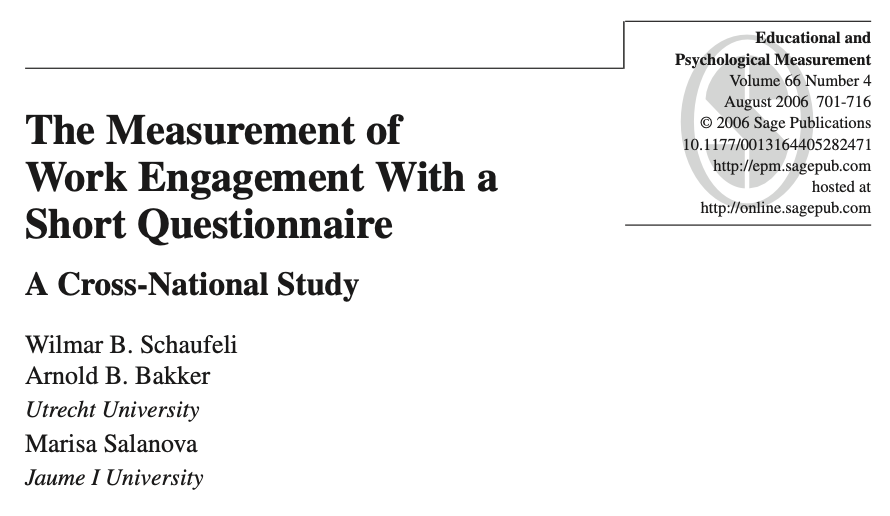
We chose "The Measurement of Work Engagement With a Short Questionnaire: A Cross-National Study" by Wilmar B. Schaufeli, Arnold B. Bakker (Utrecht University), and Marisa Salanova (Jaume I University). Published in Educational and Psychological Measurement, Volume 66, Number 4, August 2006.
Why this paper?
- 16 pages, PDF format
- Dense academic content: psychometric testing, burnout scales, Cronbach's alpha, confirmatory factor analysis
- Footnotes, citation formatting, multi-column layout
- Exactly the kind of paper a researcher would need to translate to read or cite
Settings: English to French, standard engine (available on FREE tier), Quality Comparison enabled to track results.
Hardware: MacBook M1 PRO (10-core CPU, 16GB RAM)
Fast Mode: 48 Seconds
Translation time: 48s
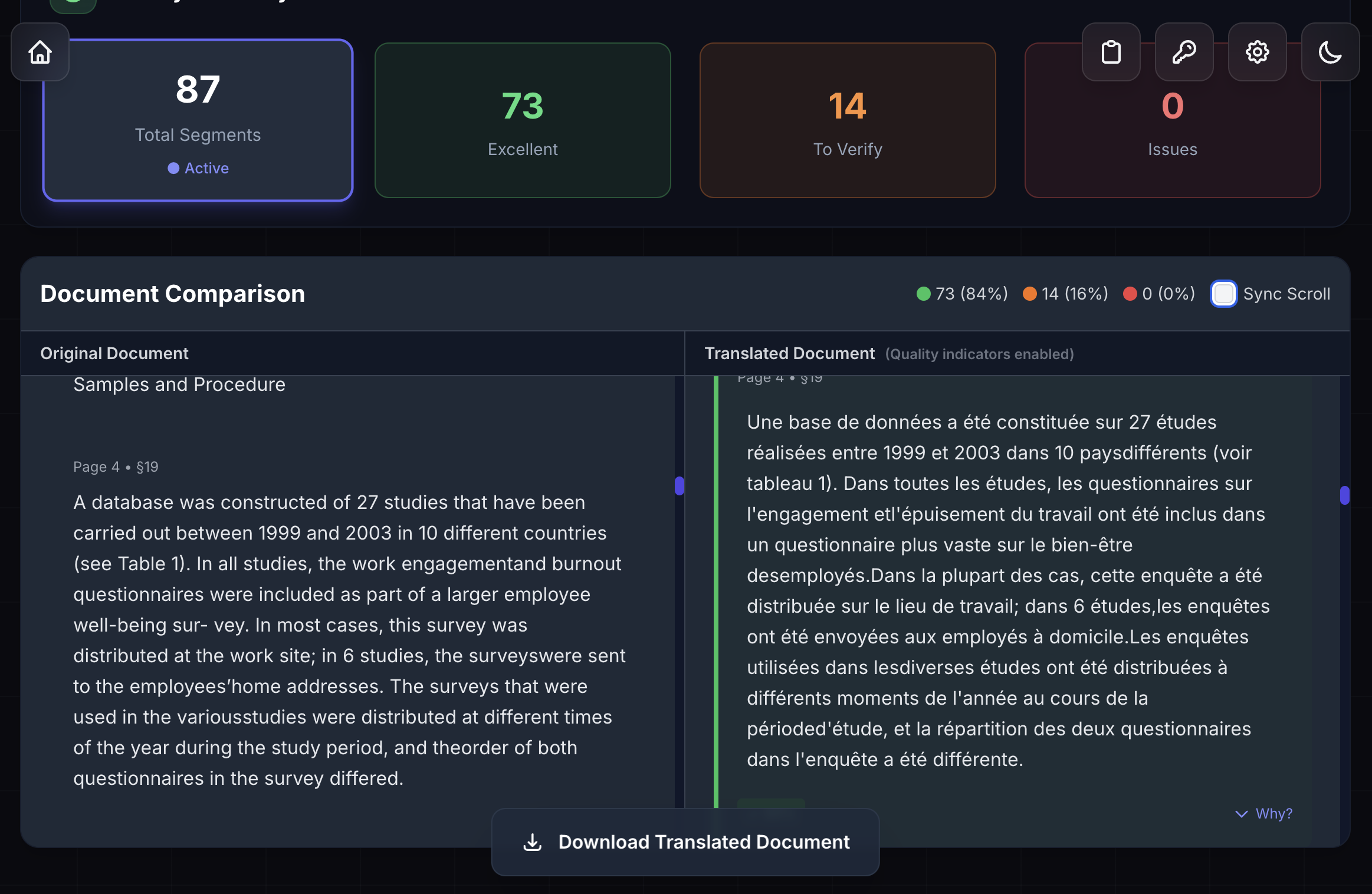
Quality: 73 excellent / 87 total (84%)
To verify: 14 segments
Issues: 0
Fast mode translated the complete 16-page paper in 48 seconds.
Quality Breakdown
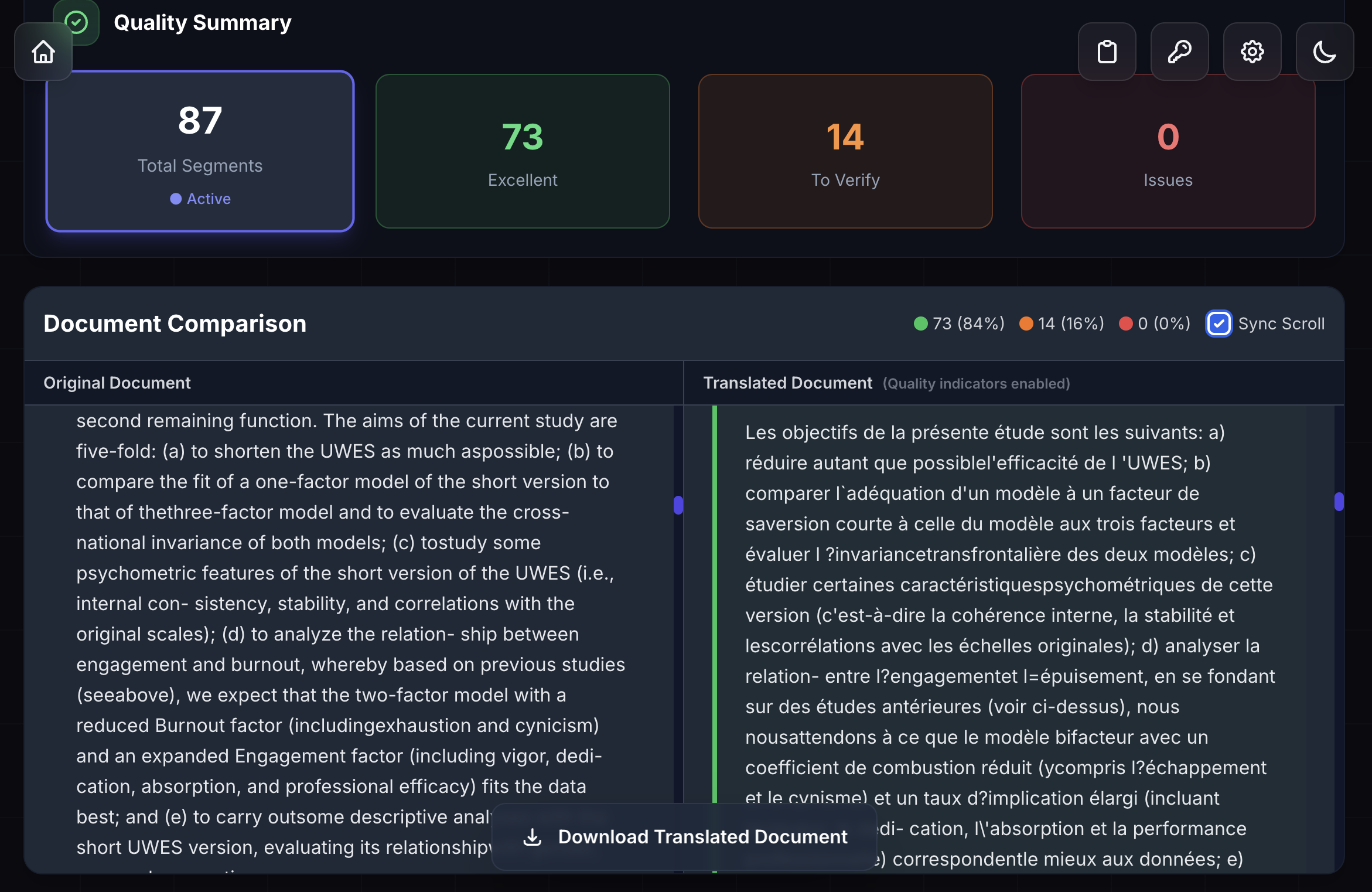
The Quality Comparison feature grades each segment automatically:
- 84% rated Excellent (73 out of 87 segments)
- 14 segments flagged for review (16%)
- 0 critical issues
The 14 "To Verify" segments are not errors. They are segments the quality analyzer flagged because it is less certain about them, and they appear in the side-by-side comparison view where you can read original English next to French translation and decide in seconds whether the wording is accurate.
Scanning 14 segments takes 3-4 minutes. Total time from upload to reviewed translation: under 5 minutes for a 16-page paper.
When to Use Fast for Research
Screening papers: You have 20 conference papers to review. Translate all 20 in Fast mode to identify the 3 that are actually relevant. Then read those 3 carefully.
Quick bibliography check: Need to know if a paper is worth citing? Get a full translation in under a minute.
First-pass reading: Understand the paper's argument, methodology, and conclusions before deciding whether to go deeper.
Balanced Mode: 1 Minute 1 Second
Translation time: 1m 1s
Quality: 73 excellent / 87 total (84%)
To verify: 14 segments
Issues: 0
Balanced mode completed the same 16-page paper in 1 minute 1 second.
The Comparison
Both modes delivered identical results for this document: 73 excellent, 14 to verify, 0 issues. The 13-second difference in translation time did not change the output quality.
What this means in practice: for a 16-page academic paper, Fast mode is the better choice. You get the same translation, faster. Balanced mode shows its advantage on longer documents (100+ pages) where the extra processing time produces more consistent phrasing across the whole text.
When to Use Balanced for Research
Book-length academic texts: A 300-page thesis or monograph benefits from Balanced mode's more consistent handling across the full document.
Papers you plan to cite formally: If you are quoting from the translation in your own work, Balanced gives slightly more consistent sentence structure.
What 84% Actually Means
The score is worth understanding clearly.
Academic research papers in PDF format have a non-linear layout: two columns sitting side by side, figures embedded in the text flow, captions, footnotes, statistical tables, and section headers that interrupt the reading order. Before any translation happens, LINGUAE needs to extract the text from the PDF and reconstruct the correct reading sequence from this layout.
That parsing step is significantly more complex for a research paper than for a standard document. When text blocks from two columns sit adjacent in the PDF file, the segmentation algorithm has to determine where one block ends and the other begins. Some of those boundaries create segments that are slightly misaligned with natural sentence breaks, which is what the quality analyzer flags.
In other words: the 14 flagged segments largely reflect PDF layout parsing, not translation quality. Reading through the translated paper, the meaning comes through clearly throughout.
The 0 issues score confirms this. Problems that actually affect meaning, missing content or clearly wrong wording, registered as zero. The 14 flagged segments are the analyzer saying "check this one," not "this is wrong."
Where improvement is coming: more robust handling of complex document formats, specifically multi-column PDF layouts, embedded formulas, figures with captions, and the specialized formatting conventions common in academic publishing. As that parsing improves, quality scores for research papers will better reflect the actual translation accuracy.
Bottom line: you get a readable, usable translation in under 60 seconds. The 14 flagged segments are worth a quick review, and the side-by-side view makes that straightforward.
Research Workflow Guide
| Mode | Time | Quality | Best For |
|---|---|---|---|
| Fast | 48s | 84% | Screening, quick reads, bibliography review |
| Balanced | 1m 1s | 84% | Longer documents, formal citation work |
Two-Pass Workflow for Literature Reviews
When working through a reading list:
- Pass 1 (Fast): Translate all papers, 20 papers at 48 seconds each = 16 minutes for the full batch
- Select relevant papers: Read Fast translations to identify which papers matter
- Pass 2 (Balanced): Re-translate the 3-5 most relevant papers for careful reading
This gives you full coverage of a reading list in the time it used to take to read one paper.
For a Single Paper
A researcher needs to read a foreign-language survey paper and assess its methodology:
- Fast mode: full 16-page translation in 48 seconds
- Read translated version: understand the paper's scope and approach
- Review 14 flagged segments: 3-4 minutes focused on the key findings section
- Total: under 5 minutes to fully assess a paper
Without LINGUAE: open the PDF, copy a section, paste into a browser translator, lose column formatting, get 5,000 characters before hitting the limit, copy the next section, reassemble, roughly 20-30 minutes per paper, with formatting broken throughout.
Getting Started
The standard engine used in this test is available on the FREE tier, no payment required.
- Download LINGUAE - Free for documents up to 5MB (covers any academic paper)
- Drop your PDF and select your language pair
- Pick Fast or Balanced - both deliver the same result for shorter papers
- Review flagged segments in the side-by-side comparison view
For researchers working with larger files or high volumes, LINGUAE PRO gives you unlimited documents, 50MB file support, Translation Memory, and Quality Comparison for $9.99/month.
Questions or want to share your results? Contact us